Resources
Ollama vs. vLLM in Production
Choose the LLM serving stack from the deployment's concurrency, memory, latency, model, and operations requirements.
By Doruk Sönmez, M.Sc.
AI Solutions Architect, CTai LABS/Connect Tech Inc.
Technical review: Rob Callaghan, P.Eng., Chief Product Officer, Connect Tech Inc.

Key Takeaways
- Why Choose CTai LABS for LLM Serving Strategy: CTai LABS consults on the complete Edge or on-prem deployment, evaluating model format, quantization, context length, KV cache, concurrency, memory headroom, power, thermals, API integration, and target hardware to determine which serving approach best fits the production workload
- Ollama and vLLM can both expose local models through APIs, support concurrent requests, and run on NVIDIA® GPU hardware. The production decision is therefore about serving behavior and system fit, not whether one tool can serve an LLM at all
- Ollama provides model management, local serving, OpenAI-compatible endpoints, configurable parallel requests, model residency controls, Flash Attention, and KV-cache quantization. Its concurrency is explicitly bounded by available memory and context allocation (Ollama, 2026a; Ollama, 2026b)
- vLLM is designed around high-throughput model serving, with PagedAttention, continuous batching, prefix caching, chunked prefill, multiple parallelism strategies, production metrics, and a Kubernetes-oriented Production Stack (vLLM, 2026a; vLLM, 2026c; vLLM, 2026d)
- Single-request latency and aggregate serving throughput are different optimization targets. Production evaluation should measure time to first token, inter-token latency, tokens per second, request throughput, queueing, memory use, and behavior under the intended concurrency
Getting an LLM to answer one prompt is a development milestone. Serving that model inside a production system is a different engineering problem. The runtime must manage model residency, prompt processing, KV cache, request scheduling, concurrent users or agents, memory pressure, API behavior, observability, and failure handling while still meeting the application’s latency and throughput targets.
Ollama and vLLM approach that serving problem from different starting points. Ollama packages local model management and serving into a straightforward runtime with native and OpenAI-compatible APIs. vLLM is an inference and serving engine built around high-throughput scheduling and efficient attention-memory management. Both can be production components. The correct choice depends on what the deployed system has to sustain (Ollama, 2026a; vLLM, 2026a).
CTai LABS helps teams evaluate that choice in the context of the full deployment. The team can benchmark Ollama and vLLM against the target model, concurrency, context length, memory budget, latency and throughput goals, API requirements, and GPU or Edge hardware, then optimize the serving stack around the production workload rather than choosing a runtime from feature lists alone.
The comparison changes when the workload moves into production
A single interactive user can make two serving stacks look similar because the accelerator spends most of its time on one sequence. As concurrent requests increase, the server must decide which work enters the batch, how prompt prefill and token decode share the accelerator, how KV cache is allocated, what waits in a queue, and what happens when memory is exhausted.
That is why a useful comparison starts with workload shape: number of simultaneous requests, prompt length, output length, shared prefixes, model size, quantization, expected burst behavior, and the latency service level. A framework benchmark without those conditions is not a production architecture decision.
Platform selection: Jetson Orin™ vs. Jetson Thor™ and the Connect Tech carrier board lineup
Ollama vs. vLLM: the production comparison
| Decision factor | Ollama | vLLM |
|---|---|---|
| Serving model | Local model runtime and server with model pull/create workflows, native API, and partial OpenAI API compatibility. | Purpose-built inference and serving engine with OpenAI-compatible APIs and broad Hugging Face model support. |
| Concurrency | Supports parallel requests when memory permits. OLLAMA_NUM_PARALLEL controls per-model parallelism; queued requests can be capped with OLLAMA_MAX_QUEUE (Ollama, 2026b). | Continuous batching schedules incoming requests together; chunked prefill and scheduler tuning expose explicit TTFT, ITL, and throughput trade-offs (vLLM, 2026a; vLLM, 2026b). |
| KV-cache behavior | Context and parallelism directly affect memory allocation. Flash Attention and configurable KV-cache quantization can reduce cache memory use (Ollama, 2026b). | PagedAttention is a core memory-management mechanism; prefix caching and KV-cache-aware production routing are available in the broader serving stack (vLLM, 2026a; vLLM, 2026d). |
| Model residency | Can keep models loaded, unload them immediately, and load multiple models concurrently when memory permits (Ollama, 2026b). | Serving is typically configured around one or more model-serving instances; distributed and multi-model patterns depend on the deployment architecture. |
| API integration | Native Ollama API plus compatibility with parts of the OpenAI API, including chat completions, completions, embeddings, and Responses API support (Ollama, 2026a). | OpenAI-compatible server supports chat/completions, Responses, embeddings, batch chat, transcription, translation, and other serving interfaces (vLLM, 2026e). |
| Scaling model | Can serve multiple models and parallel requests on a node, with behavior constrained by available system memory or VRAM. | Supports tensor, pipeline, data, expert, and context parallelism. Production Stack adds routing, monitoring, and cluster-wide deployment patterns (vLLM, 2026a; vLLM, 2026d). |
| Observability | Application teams can integrate Ollama logs and API behavior into their own monitoring stack. | Exposes production metrics through a /metrics endpoint, including serving and queue-related telemetry (vLLM, 2026c). |
| Best-fit question | Does the deployment need a compact local serving layer with straightforward model management and bounded concurrency on the available hardware? | Does the deployment need a serving engine optimized around sustained concurrency, batching, accelerator utilization, distributed serving, or production-scale request management? |
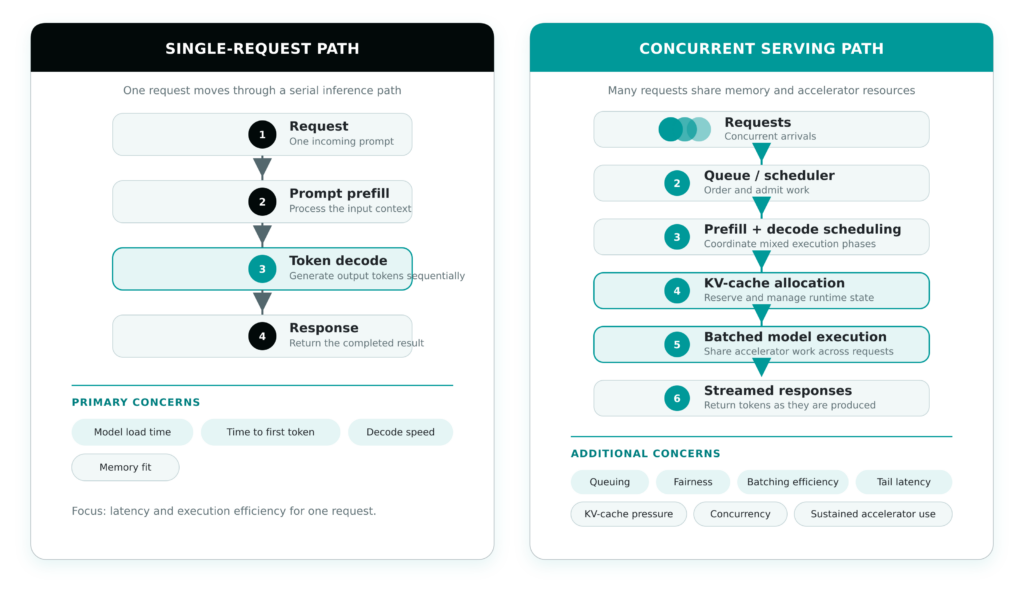
Figure 1. Production LLM serving adds scheduling and shared-memory behavior that a single-request test does not exercise. As concurrency rises, the serving engine has to trade time to first token, inter-token latency, throughput, and memory headroom across multiple active sequences.
CTai LABS validates LLM serving against the production system
Selecting Ollama or vLLM is only one part of deploying an LLM at the Edge or on-prem. CTai LABS evaluates the serving layer within the broader deployment, including the model, runtime, target hardware, memory allocation, application services, and expected workload.
This system-level evaluation aligns with the CTI EdgeAI Stack, connecting the compute platform, ai runtime, model, memory, application software, and deployment requirements instead of treating LLM serving as an isolated framework decision.
Testing begins with the conditions the deployed application must sustain. CTai LABS can benchmark representative prompt and output lengths at the required concurrency, then measure time to first token, inter-token latency, aggregate throughput, memory use, KV-cache behavior, power, and thermal performance on the target Connect Tech Edge platform. The same testing can expose whether the limiting factor is the serving engine, model architecture, quantization strategy, available memory, memory bandwidth, or underlying hardware.
That distinction determines the next engineering step. A model-side constraint can move into ai Model Optimization, including runtime, precision, quantization, and inference-performance work. Memory pressure or insufficient concurrency headroom can move into Memory Optimization, where the complete application footprint is profiled against the available module configuration. Integration requirements can extend into Full-Stack ai Engineering, including APIs, retrieval and local data sources, application services, observability, deployment packaging, and model lifecycle.
The result is not simply a framework recommendation. CTai LABS can establish a validated deployment configuration: the serving engine and model combination, supported context and concurrency envelope, expected latency and throughput, memory and power headroom, and the hardware configuration required to sustain the application in production.
When Ollama is a strong candidate
- The application needs a straightforward local model runtime and API on a single system.
- Concurrency is bounded and can be validated within the available memory envelope.
- Model pull, creation, local management, and OpenAI-compatible application integration are valuable to the development and deployment workflow.
- The deployment benefits from GGUF-based model availability or Ollama’s supported local-model ecosystem.
- The system does not require the distributed serving and cluster-management capabilities that would justify a more complex serving stack.
When vLLM is a strong candidate
- Sustained multi-request throughput and accelerator utilization are primary requirements.
- The workload needs continuous batching, prefix caching, chunked prefill, or explicit scheduler tuning.
- The serving architecture needs tensor, pipeline, data, expert, or context parallelism across larger GPU configurations.
- Production observability, Kubernetes deployment, routing, autoscaling, or distributed serving are part of the architecture.
- The model and target hardware are supported by the vLLM execution path required for the deployment.
A production decision framework
1.
What concurrency must the system sustain?
Specify steady-state and burst concurrency, not an undefined ‘multi-user’ requirement.
2.
What are the latency service levels?
Define TTFT, ITL, total response time, and P95/P99 targets separately.
3.
What context and output lengths are representative?
Benchmark with the prompt distribution the application will produce. KV-cache demand changes materially with context and concurrency.
4.
What model and quantization must be supported?
Confirm the serving path supports the model architecture, precision, tokenizer, tool-calling behavior, and quality target.
5.
How much memory remains for the application?
Measure the complete system, including the server, model, cache, retrieval components, operating system, and other services.
6.
Is the deployment one node or a serving cluster?
A local embedded application and a multi-GPU Kubernetes service have different operational requirements.
7.
What happens under overload?
Measure queue growth, rejection behavior, tail latency, memory pressure, and recovery when request rate exceeds steady-state capacity.
8.
How will the system be updated and observed?
Define model/version rollout, rollback, logs, metrics, health checks, and production support before the serving stack is locked.
Choosing between Ollama and vLLM is a production system decision, not a framework preference. Ollama can be a strong fit for straightforward local serving and bounded concurrency, while vLLM is designed for workloads with greater batching, scheduling, throughput, and scaling demands. CTai LABS helps teams benchmark the serving stack on the target hardware, identify the real performance or memory constraint, and optimize the model, runtime, and deployment configuration around the workload the system must sustain.

ABOUT THE AUTHOR
Doruk Sönmez, M.Sc.
AI Solutions Architect, CTai LABS
Doruk is an AI Solutions Architect at CTai LABS, the Physical AI and Edge AI services division of Connect Tech Inc., an NVIDIA Elite Partner. An NVIDIA DLI Certified Instructor, he specializes in deploying vision-language models, agentic AI workflows, and accelerated video pipelines on NVIDIA Jetson platforms.
Book a Demo
Bring the model, target hardware, representative prompts, context length, expected concurrency, and latency target. CTai LABS can benchmark the serving path on the intended deployment platform and determine whether Ollama, vLLM, or another supported runtime is the right fit for the production system.
 Learn More
Resources and Frequently Asked Questions
Related
ai Model Optimization. Optimize the model, precision, runtime, and serving configuration against the target Edge hardware.
See ai Model Optimization →Full-Stack ai Engineering. Integrate the serving layer into the wider Edge ai application, hardware, data path, and deployment architecture.
See Full-Stack ai Engineering →Memory Optimization. Profile the complete workload and determine how much concurrency and context the target memory configuration can sustain.
See Memory Optimization →Edge ai Memory Bandwidth. Understand when model-serving performance is constrained by memory movement rather than available compute.
Read Edge ai Memory Bandwidth →Sources
Kwon, W., Li, Z., Zhuang, S., Sheng, Y., Zheng, L., Yu, C. H., Gonzalez, J. E., Zhang, H., & Stoica, I. (2023). Efficient memory management for large language model serving with PagedAttention. Proceedings of the 29th Symposium on Operating Systems Principles, 611–626.
https://doi.org/10.1145/3600006.3613165Ollama. (2026a). OpenAI compatibility. Ollama documentation.
https://docs.ollama.com/api/openai-compatibilityOllama. (2026b). FAQ. Ollama documentation.
https://docs.ollama.com/faqOllama. (2026c). Context length. Ollama documentation.
https://docs.ollama.com/context-lengthOllama. (2026d, June 5). Improved performance and model support with GGUF. Ollama Blog.
https://ollama.com/blog/improved-performance-and-model-support-with-ggufOllama. (2026e). Hardware support. Ollama documentation.
https://docs.ollama.com/gpuvLLM. (2026a). vLLM documentation.
https://docs.vllm.ai/en/stable/vLLM. (2026b). Optimization and tuning. vLLM documentation.
https://docs.vllm.ai/en/stable/configuration/optimization/vLLM. (2026c). Production metrics. vLLM documentation.
https://docs.vllm.ai/en/stable/usage/metrics/vLLM. (2026d). vLLM Production Stack.
https://docs.vllm.ai/projects/production-stack/en/latest/vLLM. (2026e). OpenAI-compatible server. vLLM documentation.
https://docs.vllm.ai/en/latest/serving/online_serving/openai_compatible_server/vLLM. (2026f). Installation. vLLM documentation.
https://docs.vllm.ai/en/stable/getting_started/installation/Ollama vs. vLLM FAQ
Is vLLM always faster than Ollama?
No. Performance depends on the model, hardware, quantization, prompt/output distribution, concurrency, and configuration. vLLM is explicitly optimized for high-throughput serving, but a production decision should be based on the application’s measured latency and throughput requirements rather than a framework-wide claim.
Can Ollama handle concurrent production requests?
Yes. Ollama supports parallel request processing and multiple loaded models when memory permits. OLLAMA_NUM_PARALLEL controls per-model parallelism, and additional requests can be queued. Increasing parallelism also increases memory requirements because context allocation grows with the number of parallel requests (Ollama, 2026b).
Why is vLLM associated with high-throughput serving?
vLLM includes PagedAttention, continuous batching, chunked prefill, prefix caching, and multiple distributed parallelism strategies. Those mechanisms are designed to improve how the serving engine schedules work and uses accelerator and KV-cache resources under concurrent demand (vLLM, 2026a).
Do Ollama and vLLM both support OpenAI-compatible APIs?
Yes, although their supported endpoint sets and request fields are not identical. Ollama documents compatibility with parts of the OpenAI API, while vLLM provides an OpenAI-compatible server covering chat, completions, Responses, embeddings, and additional endpoints (Ollama, 2026a; vLLM, 2026e).
How does context length affect the serving decision?
Longer context increases runtime memory requirements, particularly KV-cache demand. Under concurrency, multiple active sequences compound that pressure. Context length therefore must be benchmarked together with parallel requests and available memory.
Can CTai LABS run this comparison on NVIDIA Jetson hardware?
Yes. CTai LABS can benchmark the supported serving paths on the intended Jetson and software configuration, using representative prompts, concurrency, model settings, and system load. Framework and model support are validated on the target configuration before a production recommendation is made.
What if neither framework meets the target?
The next step depends on the measured bottleneck. CTai LABS can evaluate model quantization, model substitution, context and concurrency limits, memory optimization, serving configuration, or a different hardware target. The framework should not be treated as the only variable.
What should we give CTai LABS to start?
The model or model family, target hardware, expected context length, representative prompt and output lengths, concurrency profile, latency targets, API/application requirements, and any existing measurements. If the hardware is still being selected, CTai LABS can include platform-fit testing in the scope.
Ready to Build Smarter?
Let’s create the intelligent Edge AI solution that moves your business forward.