Resources
Memory Optimization
for Physical ai
Right-size Edge ai workloads to the memory capacity required for production.
By Ceri Nelmes
Tech Marketing Leader & Journalist | Building Brands at the Edge of What’s Next | Connect Tech & CTai Labs
Technical review: Rob Callaghan, Chief Product Officer, Connect Tech Inc.

Key Takeaways
- Memory Optimization helps Edge ai teams determine whether a workload can operate reliably within a lower-memory module configuration
- CTai LABS profiles the complete workload on target hardware, identifies where memory is being consumed, applies workload-specific optimizations, and validates the resulting configuration on-device
- The service supports teams exploring a One-SKU-Down strategy, resolving out-of-memory or headroom constraints, fitting multiple models on one platform, and reducing unnecessary memory capacity in the bill of materials
- CTai LABS demonstrated the approach by moving a dual-model generative video ai stack previously scoped for 64 GB onto an NVIDIA® Jetson AGX Orin™ 32GB module. Idle free RAM increased from 5.3 GB to about 10 GB, creating room for a second generative model (CTai LABS, 2026)
- The 64GB-to-32GB result is a proof point for the methodology. The appropriate module for each customer is determined through measurement and validation of that customer’s workload
Memory capacity can define whether an Edge ai deployment fits its intended hardware. Model weights, runtime allocations, caches, video buffers, the operating system, application services, and concurrent processes all draw from the same available memory. The combined footprint influences module selection, bill of materials, and the operating headroom left for production.
CTai LABS Memory Optimization is a focused engineering service for teams that need evidence for how much capacity their workload requires. CTai LABS profiles the complete system on target hardware, locates the largest sources of pressure, applies appropriate software and runtime changes, and verifies the resulting fit on-device.
Right-sizing memory for One-SKU-Down deployments
The NVIDIA® Jetson™ portfolio gives developers multiple memory and performance options within a platform generation. Choosing among them is both a technical and commercial decision, particularly when memory capacity, compute, I/O, and unit economics must be balanced for production (Connect Tech, 2026).
A One-SKU-Down evaluation asks whether the same workload can meet its production requirements on a lower-memory or lower-tier module. CTai LABS measures real device behavior, reduces avoidable consumption where practical, and preserves the latency, quality, and operational margin required by the use case. The outcome is a module-fit recommendation grounded in measured results.
Lower-memory hardware can reduce unnecessary capacity in the bill of materials when the workload supports it. Connect Tech’s Jetson T3000 and Jetson T2000 launch article frames this as a broader right-sizing decision across memory, compute, and module economics (Connect Tech, 2026).
As of August 2026, memory capacity has also become a more visible cost driver across electronics. Reuters reported in February 2026 that surging DRAM prices were raising smartphone device costs, while IDC projected a 14% increase in average selling price for the year (Reuters, 2026). In August, Reuters reported historically high memory costs continuing to pressure smartphone and tablet margins at Xiaomi (Park, 2026). Axios separately reported that the U.S. producer-price index for electronic components and accessories rose 27.6% year over year in June, alongside sharply higher memory prices affecting smartphones, laptops, cloud storage, and hardware (Peck, 2026). These market signals strengthen the case for avoiding unused capacity, while the correct memory choice for any Edge ai product still has to be proven against the real workload.
What consumes memory in an Edge ai system?
The memory budget extends well beyond the model file. A production Edge ai system may need capacity for several components at once, including:
- Model weights and inference-engine allocations.
- Intermediate tensors, activations, and runtime workspaces.
- KV cache for transformer and generative ai inference.
- Video decode, image buffers, preprocessing, and sensor pipelines.
- Multiple resident models or model-serving instances.
- Operating-system services, containers, application processes, and supporting software.
For transformer serving, NVIDIA’s TensorRT™-LLM backend provides explicit controls for GPU memory allocated to KV cache, along with options for host-memory offload and cache reuse. Those controls show why generative ai sizing must account for serving behavior and cache policy in addition to model weights (NVIDIA, 2026).
Independent systems research reaches a similar conclusion for large language model serving. Kwon et al. (2023) showed that KV-cache fragmentation and redundant allocation can waste substantial memory, and introduced PagedAttention to manage cache memory more efficiently. The broader lesson for embedded ai is that memory budgeting should include runtime allocation behavior, not only the nominal size of the model.
The 64GB-to-32GB One-SKU-Down proof point
CTai LABS tested the methodology on Scene Analyzer Agent, a real-time video analysis workload built around NVIDIA Video Search and Summarization Blueprint for smart spaces. The dual-model video ai stack had originally been scoped for 64GB. The engineering goal was to run both generative models and the full stack on a Jetson AGX Orin™ 32GB module (CTai LABS, 2026).
The migration combined platform, runtime, and software changes. CTai LABS moved from JetPack 6 to JetPack 7.2, ported the stack to DeepStream 9.0, evaluated model-serving settings, and tracked memory with live device telemetry. Published results showed idle free RAM increasing from 5.3 GB to about 10 GB, creating enough room for the second generative model. The 32GB system also sustained three live 720p30 RTSP streams with continuous alerting (CTai LABS, 2026).
The proof point shows how measured behavior can change a hardware-sizing decision. CTai LABS applies the same profiling and validation method to other supported platforms, with the final recommendation determined by each customer’s workload and deployment requirements.
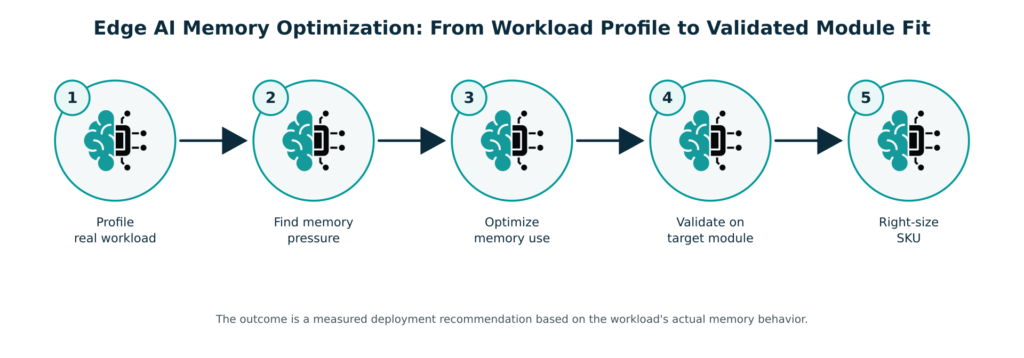
Figure 1. CTai LABS profiles the complete Edge ai workload, identifies the largest sources of memory pressure, applies targeted changes, and validates module fit on the intended hardware.
The CTai LABS Edge ai Memory Optimization workflow
1.
Define the deployment target
Establish the current module, candidate One-SKU-Down option, representative operating conditions, concurrency, performance targets, and the operational margin required for stable deployment.
2.
Profile the complete workload
Measure memory use on the target platform under representative conditions. The profile includes the model, runtime, caches, video or sensor processing, supporting services, and other resident processes.
3.
Identify memory pressure
Determine which components consume the available memory and which allocations can be changed without compromising the production requirement.
4.
Apply workload-specific optimization
Tune the parts of the software stack that materially affect memory use. Depending on the workload, this can include model-serving settings, precision choices, cache allocation, model residency, runtime options, or software-level changes.
5.
Validate performance and headroom
Re-run the workload on-device and measure memory alongside latency, throughput, and output quality. The final setup must preserve enough headroom for stable operation under the agreed test conditions.
6.
Recommend the module fit
Document the optimized setup, measured results, remaining headroom, and the module option supported by the evidence.
Where Memory Optimization can help
- A workload produces out-of-memory errors or leaves too little headroom for other system functions.
- A team wants to test a One-SKU-Down option before production hardware is finalized.
- Several models need to remain resident or run concurrently on one Edge platform.
- A generative ai deployment is constrained by model weights, KV cache, context length, concurrency, or serving settings.
- A prototype was conservatively sized and the team needs measured evidence for the production memory requirement.
- Memory capacity is materially affecting the bill of materials or procurement plan.
- An existing workload is moving to a new NVIDIA Jetson platform and needs its memory requirement revalidated.
What you receive from a CTai LABS Memory Optimization engagement
- A baseline memory profile of the complete workload on target hardware.
- A breakdown of the primary sources of memory pressure.
- An optimized software and runtime setup where the system supports it.
- Before-and-after measurements under agreed test conditions.
- Performance and output-quality validation alongside memory results.
- A documented view of operational headroom after optimization.
- A module-fit recommendation, including a One-SKU-Down option when the measurements support it.
Memory Optimization and ai Model Optimization
Memory Optimization and ai Model Optimization can be used together when a deployment faces both capacity and inference-performance constraints. Memory Optimization addresses the footprint and headroom of the complete Edge ai system, including models, runtimes, caches, sensor processing, and supporting services. ai Model Optimization focuses on inference behavior through runtime conversion, precision, quantization, graph and engine tuning, latency, throughput, and quality validation. CTai LABS scopes the work around the bottleneck identified during profiling.
Why CTai LABS
CTai LABS is a department of Connect Tech, an NVIDIA Elite Partner, combining ai architecture and software optimization with the embedded hardware expertise behind Connect Tech Edge platforms. Its service scope includes model and framework optimization, processor and platform integration, Jetson application enablement, sensor integration, and deployment support (CTai LABS, 2026).
Memory work benefits from this full-stack view because the production footprint is created by the complete system, not the model alone. CTai LABS can evaluate the model, serving software, sensor processing, system services, and hardware together, then validate the result on-device. Within the wider CTI EdgeAI Stack, this helps align module selection with the real memory behavior of the Physical ai workload.
Book a Demo
Bring the workload, current module, and memory constraint. CTai LABS will establish a baseline, identify the highest-impact opportunities, and determine whether a One-SKU-Down option is a viable production target.

ABOUT THE AUTHOR
Ceri Nelmes
Tech Marketing Leader & Journalist | Building Brands at the Edge of What’s Next |
Connect Tech & CTai Labs
Ceri Nelmes is Head of Marketing at Connect Tech and an experienced technology journalist and digital strategist. She covers the technologies and market shifts shaping embedded computing, Edge AI, Physical ai, robotics, autonomous systems, and the NVIDIA® ecosystem. Working with Connect Tech and CTai LABS subject-matter experts, she turns engineering developments into accurate, useful reporting for developers, technical buyers, business leaders, and the media.
 Learn More
Resources and Frequently Asked Questions
Related
ai Model Optimization. Optimize model and inference performance for the target embedded platform.
See ai Model Optimization →
Edge ai Memory Bandwidth. Explore how memory behavior affects sustained Edge ai performance.
Explore Edge ai Memory Bandwidth →
We Budgeted 64GB. Super Mode Said Otherwise. Read the CTai LABS engineering proof point behind the Memory Optimization service.
Read the Engineering Proof Point →
Services. Explore CTai LABS engineering services for Edge ai development and deployment.
Explore Services →
Sources
Connect Tech. (2026, July 15). NVIDIA's new Jetson T3000 delivers similar inference performance of the T5000 module. In this memory market, that is the whole story.
https://connecttech.com/jetson-t3000-t2000-launch/CTai LABS. (2026, July). We budgeted 64GB. Super Mode said otherwise: Two generative models on one NVIDIA Jetson 32GB module.
https://ctailabs.ai/wp-content/uploads/2026/07/We_Budgeted_64GB_Super_Mode_Said_Otherwise.pdfNVIDIA. (2026). Model configuration: TensorRT-LLM backend. NVIDIA Triton Inference Server documentation.
https://docs.nvidia.com/deeplearning/triton-inference-server/user-guide/docs/tensorrtllm_backend/docs/model_config.htmlKwon, W., Li, Z., Zhuang, S., Sheng, Y., Zheng, L., Yu, C. H., Gonzalez, J. E., Zhang, H., & Stoica, I. (2023). Efficient memory management for large language model serving with PagedAttention. Proceedings of the 29th Symposium on Operating Systems Principles, 611–626.
https://doi.org/10.1145/3600006.3613165Park, J. (2026, August 18). Xiaomi sees smartphone cost pressures easing, looks to EVs for growth. Reuters.
https://www.reuters.com/world/asia-pacific/xiaomis-q2-profit-slides-426-component-cost-pressure-2026-08-18/Peck, E. (2026, August 11). Why “chipflation” is here to stay. Axios.
https://www.axios.com/2026/08/11/chips-memory-inflation-aiReuters. (2026, February 26). Smartphone market set for biggest-ever decline in 2026 on memory price surge, IDC says.
https://www.reuters.com/business/media-telecom/smartphone-market-set-biggest-ever-decline-2026-memory-price-surge-idc-says-2026-02-26/Frequently Asked Questions
What is Memory Optimization for Edge ai?
Memory Optimization measures and reduces the footprint of an Edge ai workload so it can operate with appropriate production headroom on the intended hardware. CTai LABS evaluates the complete system, including models, runtimes, caches, sensor processing, and supporting services.
What does One-SKU-Down mean for a Memory Optimization project?
One-SKU-Down describes evaluating whether a workload can move to a lower-memory or lower-tier module while still meeting deployment requirements. CTai LABS uses on-device profiling and validation to determine whether the option is viable.
Can ai Memory Optimization help with out-of-memory errors?
Yes. CTai LABS can profile the system to identify allocations and processes contributing to memory pressure, then evaluate changes that reduce the footprint. The appropriate approach depends on the model, runtime, serving settings, sensor processing, and software architecture.
Can CTai LABS optimize generative ai memory use?
Yes. Generative ai memory demand can be shaped by model weights, KV cache, context length, concurrency, and serving settings. NVIDIA’s TensorRT-LLM backend includes explicit controls for KV-cache allocation and offload, giving CTai LABS several options to evaluate during profiling (NVIDIA, 2026).
Is the 64GB-to-32GB result applicable beyond Jetson AGX Orin?
The published 64GB-to-32GB project demonstrates the methodology on Jetson AGX Orin. CTai LABS can apply the same profiling, optimization, and validation process to other supported platform configurations. The achievable result depends on the specific workload and target hardware.
When should we consider Memory Optimization?
Memory Optimization is useful before production hardware is finalized, when a prototype has been conservatively sized, when memory pressure affects stability, or when a team needs evidence for a One-SKU-Down decision.
What does CTai LABS need to start?
Useful starting inputs include the current workload, target or candidate hardware, representative operating conditions, and deployment requirements. Existing memory measurements, out-of-memory logs, serving settings, and sensor-pipeline details can help establish the baseline.
Ready to Build Smarter?
Let’s create the intelligent Edge AI solution that moves your business forward.